7 Demo Automation Software Picks for 2026
· 16 min read
The most popular advice about demo automation software is to start with the vendor shortlist. That's backwards. Choosing the wrong demo category usually costs more than choosing the wrong vendor, because a polished capture-based walkthrough can't replace a live simulation when buyers need to test realistic workflows, and a complex sandbox can be unnecessary overhead when prospects only need self-serve discovery.
The useful split is practical. Interactive captures and guided tours work well for marketing, sales enablement, onboarding, support, and training. Live simulations and sandbox environments suit deeper product evaluation, technical validation, and scenarios where realistic data or flexible navigation matters. This roundup evaluates both types by the work they automate: recording repeatable workflows, branching by audience, republishing one capture across formats, supporting live or sandboxed evaluation, measuring viewer progress, and staying reliable after product changes.
Use the list to match the tool to one concrete job first. Then compare recording method, editing, distribution, analytics, collaboration, scale, maintenance, and likely payback. The best choice isn't the tool with the longest feature list. It's the one that removes the most expensive repetitive work without creating a larger operational burden.
Table of Contents
- 1. Rendemo
- 2. Navattic
- 3. Reprise
- 4. Walnut
- 5. Storylane
- 6. Arcade
- 7. Supademo
- Top 7 Demo Automation Tools Comparison
- Match the Tool to the Payback
1. Rendemo
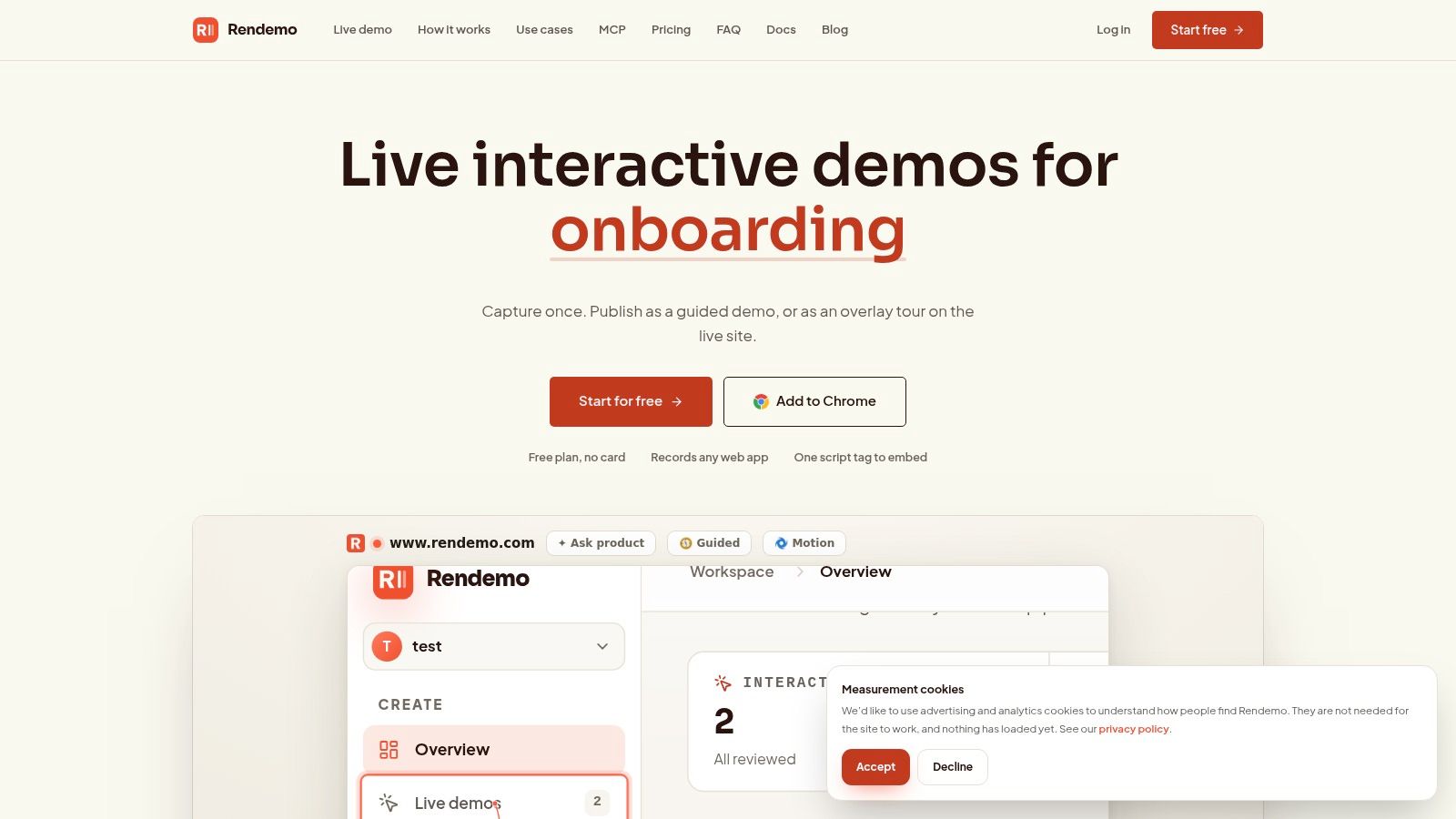
Rendemo fits teams that need to turn one repeatable product workflow into assets for several channels. Its recorder captures the real HTML of a web product, allowing viewers to click and type through a guided demo or overlay tour instead of watching a fixed video or relying on static screenshots. A Chrome extension records the workflow, and the visual Studio applies a brand kit, directs attention, and adds scripted captions.
One capture, several jobs
Reuse is the main product fit. One capture can become an embedded guided demo, an overlay tour on the live product, a shareable link, or an MP4 export. Product marketing can publish it on a website, sales can send it after a meeting, onboarding can assign a guided path, support can use it to explain a task, and training can turn it into a repeatable lesson.
Persona variants and branching adapt the source capture for audiences that care about different steps. Built-in analytics show step funnels and content gaps, so teams can see where viewers pause or leave instead of relying on total view counts.
Practical rule: Treat the first capture as a reusable source asset, not a one-off campaign file.
Reliability is another relevant job. Rendemo's included MCP server supports agent workflows with Claude, Claude Code, and other MCP-compatible agents that can generate, lint, and publish demos. The “tours as code” option lets engineering define tours in a repository and run CI verification to catch UI changes that could break a walkthrough before customers encounter it.
Pricing is tiered. Free includes real-HTML demos, one published demo, and up to 1,000 views per month. Pro costs $39 per month per workspace, with unlimited creators and up to 25,000 views. Scale costs $129 per month, with up to 150,000 views, Live Guide overlay, localization, roles and permissions, and priority rendering. Enterprise adds SSO, SLA support, and larger requirements.
The trade-off is operational. View limits and advanced controls vary by tier, while Chrome-based recording and a script-tag embed may require engineering help for unusual integrations or native applications. The free interactive demo platform makes it practical to test a real recording in about a minute before committing to a paid tier.
2. Navattic
Navattic suits product marketing and solutions engineering teams that need polished, click-through demos for websites, outreach, onboarding, and feature launches. It focuses on browser-based interactive experiences that teams can capture, package by persona or use case, and distribute through embeds and shareable links.
The practical advantage is speed of packaging. A team can build a demo library around different audiences, then direct a prospect toward the workflow most relevant to their role. Analytics show how viewers progress through steps and which areas they explore, giving sales and marketing more useful context than a video play count.
Navattic also emphasizes AI-assisted creation workflows. That can reduce the effort required to turn a product capture into a presentable asset, although teams scaling many flows should still account for setup, review, and maintenance work. The platform is often a better fit for repeatable discovery and enablement than for a fully flexible live product replica.
A demo library only creates leverage when teams can find the right flow quickly and keep each flow aligned with the current product.
Pricing and packaging lean toward mid-market and enterprise evaluation, and entry pricing isn't fully public. That makes a pilot important, especially for smaller companies comparing the cost of a polished library against a simpler capture tool. Navattic is a sensible choice when the primary job is branching content by persona and giving sales a reliable set of self-guided assets. For a broader framework on how these assets support the sales process, see this guide to software sales demos.
Visit Navattic to evaluate its interactive demo and demo-library workflow.
3. Reprise
Reprise is the broadest option in this list for organizations that need both self-guided tours and deeper simulated environments. It supports live demo environments, product tours, and sandboxed demos with anonymized or customized data. That combination matters for enterprise sales teams whose buyers may begin with an asynchronous walkthrough but later require a more realistic evaluation.
The distinction between capture and simulation is central here. A guided tour controls the learning path and works well for repeatable education. A sandbox or live simulation gives presenters more room to respond to questions, alter the scenario, and demonstrate technical workflows. Reprise brings those modes into one enterprise-oriented platform, rather than forcing teams to operate separate systems.
Enterprise flexibility has a cost
Reprise emphasizes extensibility through plugins and integrations, along with AI-assisted editing and personalization through the Reprise Replay editor. Those capabilities can help large organizations adapt demos to complex products, data models, and sales processes. They also create more decisions during evaluation, so buyers should define the first required workflow before assessing every available capability.
Pricing is request-only and positioned toward enterprise buyers. The likely trade-off isn't just subscription cost. It's the implementation and governance effort needed to keep live environments, cloned data, plugins, and self-guided tours accurate over time. Teams without technical presales or engineering capacity may find a lighter capture-first platform easier to operate.
Reprise makes sense when a buyer's job is deep product evaluation, not discovery. For a closer look at how creation choices affect demo operations, compare it with this overview of demo creation software.
Explore Reprise if your evaluation requires live simulations, sandboxed experiences, and enterprise extensibility.
4. Walnut
Walnut is built around the sales team's need to create, personalize, and maintain buyer-facing demos. It uses AI to help generate demo drafts and personalize flows from a product capture, while buyer enablement and deal-room features give salespeople a structured place to share product experiences with prospects.
That makes Walnut a strong fit when the job is not merely “publish a demo,” but “help a seller adapt a demo for this account and this buying conversation.” Integrations with go-to-market data vendors can help identify anonymous viewers, adding useful context for follow-up when a previously unknown visitor engages with a buyer-facing asset.
Walnut's AI feature set and knowledge-base tooling are aimed at speeding authoring and iteration. The benefit depends on governance. AI can produce a starting point, but product marketing and sales engineering still need to check terminology, claims, navigation, and the relevance of each branch before publishing.
Sales test: If a seller can't identify which audience or deal stage a demo serves, personalization has become decoration rather than enablement.
The main drawback is commercial and operational fit. Pricing is custom and typically evaluated by larger teams, while market feedback points to rising costs across this category. Teams should also examine how much effort is required to keep a shared demo library clean, especially when multiple sellers clone or adapt flows.
Walnut is a good choice for sales organizations that want buyer enablement, account-aware personalization, and deal-room workflows around their demos. It's less compelling if your priority is one lightweight capture reused across marketing, onboarding, support, and video. Read this comparison of sales demo tools before deciding whether sales workflow depth or cross-team reuse matters more.
See Walnut for its sales-focused demo and buyer-enablement approach.
5. Storylane
Storylane is a practical option for teams that want to create interactive demos from product captures, screenshots, or video without rebuilding the product experience. It supports marketing-site embeds, email sequences, outreach assets, and customer onboarding, with templates and branding controls that help non-technical teams publish quickly.
Its format flexibility is the main reason to consider it. A team can combine guided interaction with video, add calls to action, use AI voiceovers, and collaborate on production. That makes Storylane useful when the content team needs several presentational formats, but the organization doesn't need a full live sandbox or simulated backend.
Analytics should answer a next question
Storylane provides analytics designed around viewer activity, and its reporting model is described in terms of fixed views rather than usage-metered pricing. The important evaluation question is whether those reports help a team decide what to change next. Useful demo analytics include completion rate, step-level drop-off, and view depth, because they reveal whether viewers start, where they leave, and how much of the flow they consume. Storylane's explanation of interactive demo analytics defines those mechanics directly.
Pricing has a transparent plan structure with feature breakdowns spanning startup to enterprise needs. Storylane is also available through AWS Marketplace, which can make procurement easier for organizations that already buy through that channel. The trade-off is cost at scale. Teams comparing it with peers will need to weigh collaboration, analytics depth, authoring speed, and the number of assets they expect to maintain.
Choose Storylane when fast production, templates, branding, and multi-format content matter more than live-data simulation.
6. Arcade
Arcade targets marketers and growth teams that need lightweight, on-brand content for websites, blogs, and social channels. It combines clickable interactive demos with AI-narrated product videos, allowing teams to turn one capture into both an explorable experience and a more conventional video asset.
That combination makes Arcade especially useful for top-of-funnel education and feature communication. A visitor can click through a workflow at their own pace, while a blog or social post can use narrated video for people who prefer passive viewing. Multilingual support and professional AI voiceovers broaden the distribution options for teams producing many small assets.
Best for content velocity
Arcade has a free plan suited to testing and small assets, plus per-seat pricing for small teams. The low barrier makes it easier to validate whether interactive content earns a place in a campaign or help center before committing to an enterprise platform.
The limitation is depth. Arcade is more marketing-oriented than simulation-oriented, so teams with complex live-data requirements, technical presales scenarios, or sandbox evaluation needs may outgrow it. That isn't a weakness for every buyer. It's a useful boundary that prevents a content-production tool from being judged as though it were an enterprise demo environment.
Published analysis has connected interactive product tours with activation behavior, including a finding that users who interact with a product tour are 80% more likely to complete multiple activation steps, while another benchmark reported top-performing demos reaching a 61.6% completion rate and an 8% final click-through rate. Those figures appear together in Arcade's interactive demo statistics analysis, but they should be treated as benchmarks, not promises for every implementation.
Try Arcade when your immediate job is fast, snackable demo and video production.
7. Supademo
Supademo is designed for teams that want to get from recorded clicks to a shareable guided demo quickly. Its AI Demo Agent supports creation, while the workspace model is built for collaboration among paid creators and free viewers. Captures can become step-by-step demos distributed through embeds and shared links.
The product fits a common smaller-team problem: one person knows the workflow, another needs to review the narrative, and prospects or customers need access without becoming paid authors. Supademo's public multi-tier pricing includes Free, Growth, Scale, and Enterprise options, which lowers the barrier for a pilot and makes the initial buying decision easier to scope.
Supademo is strongest when the workflow is clear and linear. It works well for a single sales explainer, onboarding path, support answer, or internal training flow. It's less suited to complex live environments, deep data simulations, and extensibility requirements that demand a realistic product replica.
Pilot question: Can a new viewer reach the intended action without a presenter explaining what to click next?
The platform's appeal is speed, collaboration, and accessible packaging. The trade-off is that a lightweight authoring model may leave advanced enterprise simulation needs unaddressed. Smaller teams should judge it against the cost of maintaining a more powerful system they won't use fully.
Assess Supademo if you need a low-friction way to publish a few guided workflows and learn what viewers engage with.
Top 7 Demo Automation Tools Comparison
| Tool | Implementation Complexity (🔄) | Resource Requirements (⚡) | Expected Outcomes (⭐📊) | Ideal Use Cases (💡) | Key Advantages |
|---|---|---|---|---|---|
| Rendemo | 🔄 Medium–High, Chrome extension + tours-as-code/CI | ⚡ Moderate, flat per-workspace pricing, included MCP server, view caps | ⭐ High quality interactive real‑HTML demos; 📊 built‑in step analytics | 💡 Sales collateral, onboarding, engineering-verified tours | Real‑HTML free tier; one-capture multi‑publish; MCP server; CI linting |
| Navattic | 🔄 Low, no‑code quick capture and packaging | ⚡ Low–Moderate, fast creation; pricing skews mid‑market | ⭐ Good polished demos quickly; 📊 engagement analytics | 💡 TOFU/MOFU campaign demos, demo libraries, outreach | Fast to build; persona packaging; AI‑assisted workflows |
| Reprise | 🔄 High, enterprise setup, plugins and secure sandboxes | ⚡ High, enterprise pricing, integrations, engineering support | ⭐ Very high fidelity live simulations; 📊 repeatable, secure demos | 💡 Large enterprises needing sandboxed/live data demos | Full‑stack demo platform; live secure environments; extensibility |
| Walnut | 🔄 Medium–High, AI personalization + deal‑room features | ⚡ High, custom pricing, integrations, privacy controls | ⭐ High personalized sales demos; 📊 buyer insights & enablement | 💡 Sales teams, deal rooms, buyer engagement workflows | Sales‑focused AI personalization; buyer identification integrations |
| Storylane | 🔄 Low–Medium, no‑code templates and branding controls | ⚡ Low–Moderate, transparent plans, AWS Marketplace option | ⭐ Good marketing/outreach demos; 📊 fixed‑view analytics | 💡 Marketing embeds, email sequences, onboarding assets | Transparent pricing; templates; AI voiceovers and collaboration |
| Arcade | 🔄 Low, creator‑style, lightweight builder | ⚡ Low, free plan and per‑seat pricing for small teams | ⭐ Good for snackable, on‑brand demos & videos; 📊 basic engagement | 💡 Marketers, growth teams, social and blog content | Fast production; AI narration/video; clear entry pricing |
| Supademo | 🔄 Low, AI‑assisted capture to steps, team workspace | ⚡ Low, free tier, generous viewer model, transparent tiers | ⭐ Good quick explainers; 📊 simple analytics for pilots | 💡 Small teams, single‑flow explainers, quick pilots | Low barrier to entry; transparent pricing; team collaboration |
Match the Tool to the Payback
The buying decision becomes clearer when you name the job before comparing features. Choose a lightweight interactive capture platform when the priority is producing many guided assets from repeatable workflows, then distributing those assets as embeds, links, overlays, or videos. Rendemo, Navattic, Storylane, Arcade, and Supademo are most relevant when the main bottleneck is repetitive explanation across marketing, sales, onboarding, support, or training.
Choose a broader live or sandbox capability when prospects need deeper evaluation. Reprise is the clearest fit in this group when buyers must see realistic environments, customized data, or live simulations. Walnut sits closer to the sales-workflow side, where account personalization, buyer enablement, and deal-room context matter more than operating a full product replica.
The market signal supports treating interactive demos as a real go-to-market category. The live product demo software market was valued at USD 0.5 billion in 2025, projected to reach USD 0.6 billion in 2026, and forecast to reach USD 2.1 billion by 2036, implying a 13.3% CAGR from 2026 to 2036, according to Fact.MR's live product demo software market forecast. Adoption is growing, but the product category is still open enough that teams should optimize for fit and operating discipline rather than assume every platform delivers the same kind of demo.
Run a focused pilot before expanding. Choose one onboarding, support, sales, or training workflow. Record it, create one audience-specific branch, publish the format most useful to that audience, and inspect viewer drop-offs or step-funnel friction. For onboarding, the case is particularly practical: 81% of respondents rated onboarding and adoption as a high or very high impact area, and nearly half of teams in one 2026 report adopted interactive demos to address onboarding friction, as reported in Supademo's State of Interactive Demos research.
Compare total production effort, distribution flexibility, view limits, governance, and maintenance. A lower headline price can lose its advantage if every new audience requires a separate build, while an enterprise sandbox can be wasteful if buyers only need a guided first look. The right software earns its place by reducing repeat work and preserving trust after the product changes.
Rendemo captures real HTML so viewers can click and type through guided demos or overlay tours, then lets teams reuse one workflow as an embed, shareable link, live guide, or MP4. Visit Rendemo to test the free plan and see whether its analytics, branching, MCP workflows, and CI-verified tours fit your next demo automation pilot.
See it instead of reading about it
Record one workflow from your real product and publish a clickable demo anyone can follow. Real-HTML capture is on the free plan.
Start free