Digital Sales Room: What It Is and How to Use It
· 14 min read
You're probably staring at a deal right now where the champion is still positive, the meetings are fine, and yet nothing is moving. The proposal's been sent, the legal question has already come up twice, and someone in procurement is suddenly “looping in a few more people.” That's exactly where a digital sales room earns its keep, not as a seller convenience, but as the workspace the buying committee wishes it already had.
Table of Contents
- The Deal That Almost Got Away
- What a Digital Sales Room Is (and What It Is Not)
- How It Maps to the B2B Buying Journey
- Core Features Worth Comparing
- Setting One Up Before, During, and After the Deal
- Reading Engagement Signals Without Being Pushy
- Why Most Digital Sales Rooms Fail: Six Operational Habits
- A 30-Day Rollout Plan You Can Use on Monday
The Deal That Almost Got Away
A mid-market SaaS deal can look healthy for weeks while losing momentum. The champion supports the product, the rep has a solid thread, and the CFO never joins because the CFO never joins calls. Then the champion has to sell the decision internally. The deck is buried in email, the security document is outdated, and the pricing recap misses the change agreed in the last meeting.
The deal stalls because the buying committee cannot move without reconstructing the seller's story. A digital sales room gives the champion one working space for approved materials, stakeholder questions, decision context, and clear next steps. That structure helps the committee progress between meetings, where many deals are won or lost.
The problem is workspace, not content
B2B organizations rarely need another pile of collateral. They need a workspace that helps the people involved in the decision perform their jobs. Gartner's buying-journey framing matters because buyers move through problem identification, solution exploration, requirements building, and supplier selection in a non-linear way. The room must support those shifts instead of forcing every stakeholder through the seller's preferred sequence. Gartner's B2B buying journey view explains the model.
Practical rule: If the champion must assemble the narrative alone, the room is too weak.
Set ownership before sending the room. Keep one current version of each document, label materials by the stakeholder or decision they support, and record agreed actions after every meeting. Ask the champion which colleagues need access, then build for those people rather than for the rep's folder structure.
The playbook is straightforward: define the room, map it to the committee's jobs, compare the features that affect execution, and establish the habits that keep it useful after launch. A room changes deal outcomes only when the team maintains it as shared work, not when it merely stores more files.
What a Digital Sales Room Is (and What It Is Not)
A digital sales room is a secure, shared online workspace where sellers and buyers work through a deal with relevant materials, decisions, next steps, and context in one place. It gives Finance, IT, Operations, and the champion a common working area instead of making the rep resend links across separate conversations. GetAccept's definition of a digital sales room captures the basic concept.
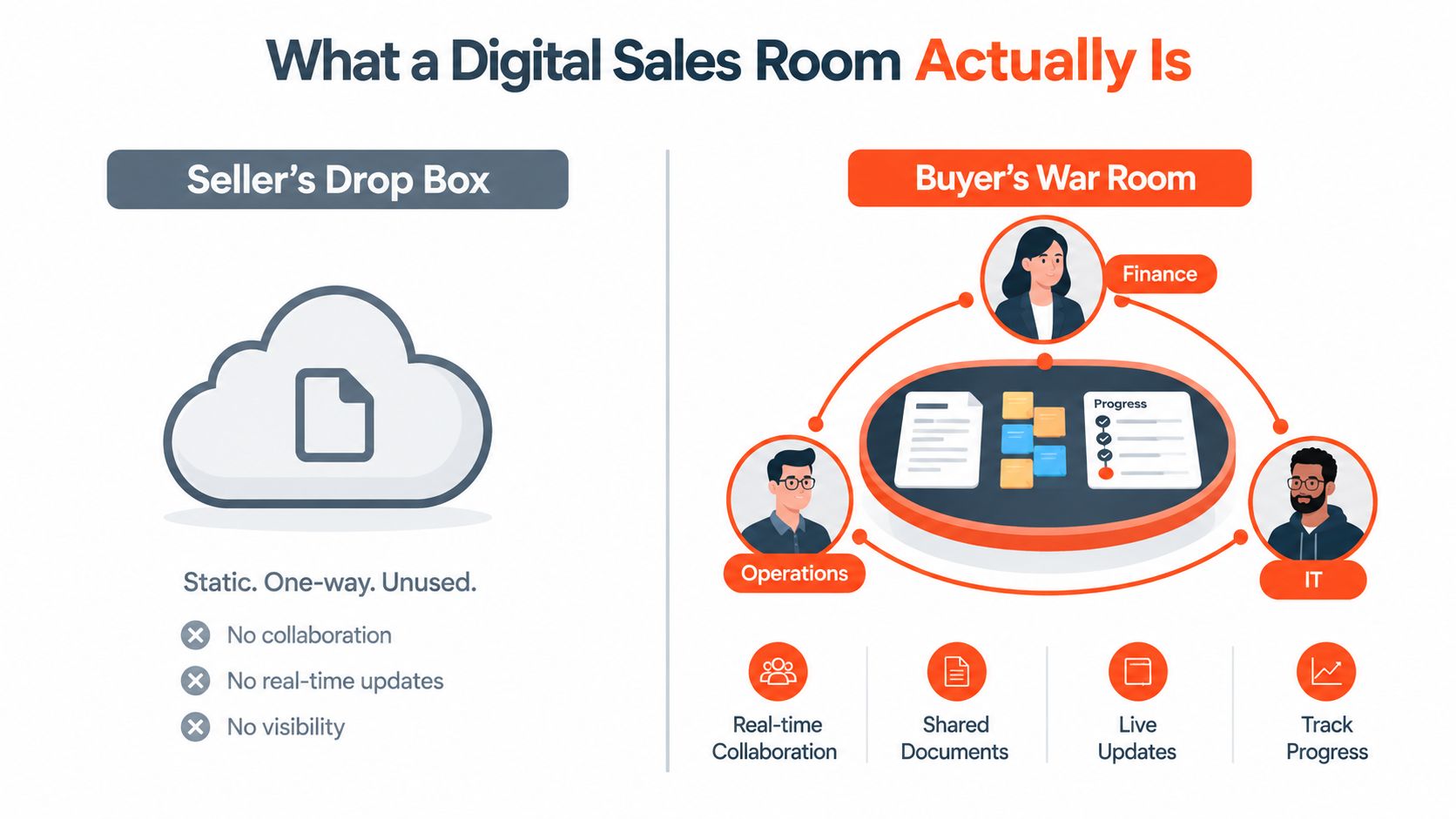
The mechanics are straightforward. Buyers retain access, content follows a clear structure, and sellers can see what the committee reviews rather than only what someone received. That visibility helps the team identify stalled decisions, unanswered questions, and the next action required.
What it is not
A digital sales room serves the buyer-facing workflow, while the CRM remains the seller's system of record. The room also differs from a proposal tool. A proposal captures the commercial offer at a point in time; the room continues to develop as stakeholders evaluate the decision.
A generic shared folder only stores files. It does not organize information around stakeholder needs, show decision context, or provide meaningful usage signals. Without those functions, a room becomes a more attractive file dump and gives the buying committee little help.
The operating test is simple: build the space for the committee, then maintain it around their decisions. Its value comes from helping buyers work together and showing sellers where support is needed, not from adding another place to upload collateral.
How It Maps to the B2B Buying Journey
Gartner's four jobs are the right operating model for a room too. Build each area around the committee's decision, or the room becomes a content dump instead of a workspace.
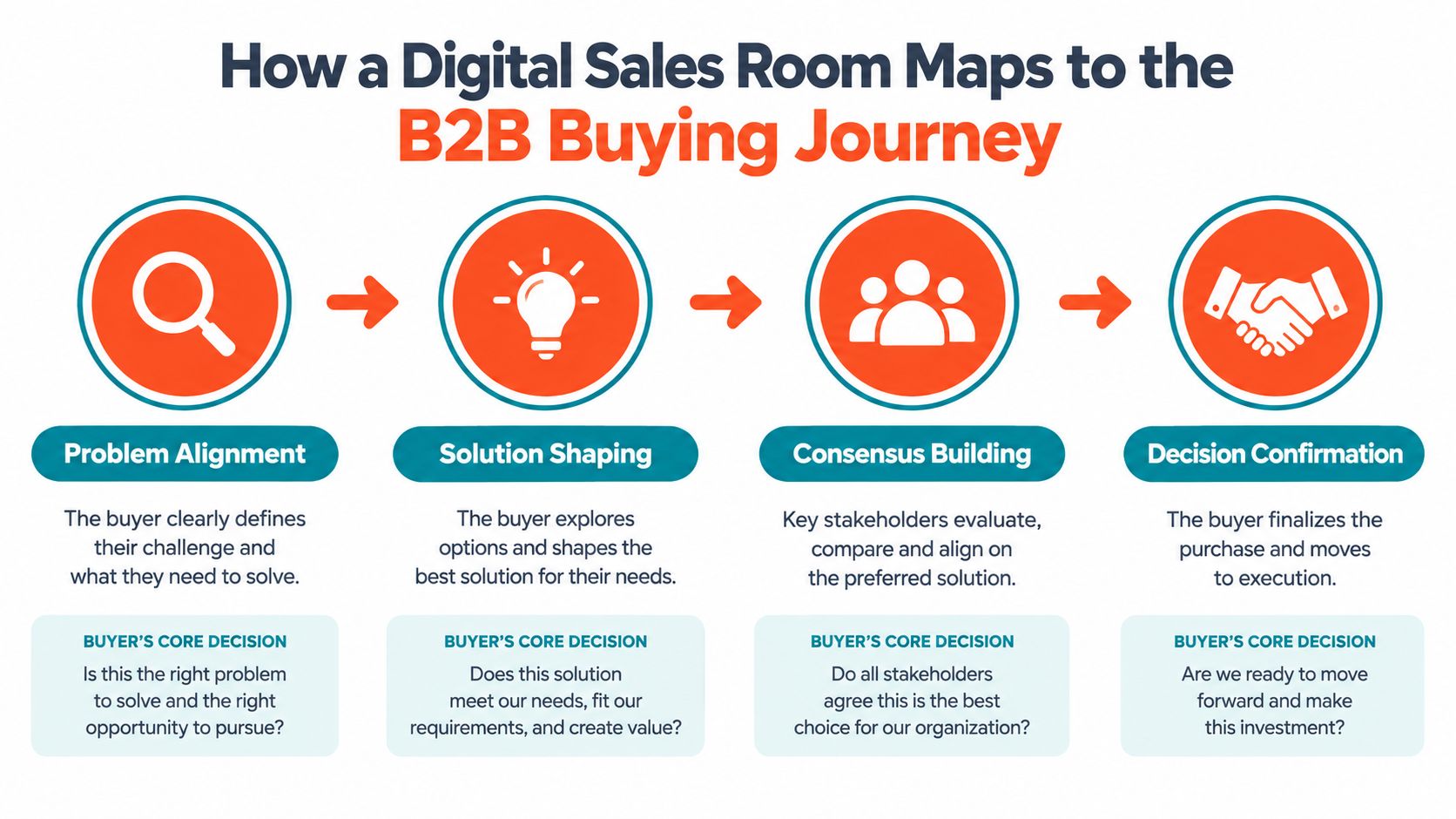
Match each buying job to one decision
During problem identification, the committee decides whether the pain justifies funding. Give them problem framing, business impact, and ROI logic. If the room cannot sharpen the problem, it is not helping the deal.
During solution exploration, buyers test whether your approach fits their situation. Add a side-by-side comparison matrix, relevant use cases, and a short walkthrough. Keep practical details visible. Marketing language should never force buyers to search for the answer.
In requirements building, the committee checks risk, security, integration, and technical fit. Place the security pack, implementation overview, and integration notes together. If IT cannot find its answers, the champion must translate the material manually, slowing internal agreement.
During supplier selection, the decision becomes commercial. Put pricing, procurement-ready material, and a clear next-step block where the committee can act on them. Another feature sheet adds little at this point. Clarity closes more ground than volume.
The room should serve the people who usually slow deals
The economic buyer needs a concise business case. The champion needs a link they can forward confidently. The technical evaluator needs proof and detail. The end user needs to see whether the workflow works in practice.
Give each person a clear path to the answer they need. That means organizing the room around committee decisions, then updating it as questions surface. A polished workspace still fails if nobody maintains ownership, removes outdated material, or records the next action.
The operating standard is simple: every important stakeholder should find relevant evidence quickly and know what decision comes next. That turns the room into shared deal infrastructure instead of a nicer place for confusion to live.
Core Features Worth Comparing
Buyers should score vendors before they ever sit through a polished demo. The right room is a mix of content control, collaboration, visibility, and governance. If a platform is strong in one area but weak everywhere else, it'll look good in a pilot and get ignored in real deals.
If you're comparing tools that support the wider demo stack, this sales demo tools guide is a useful companion read.
| Feature Category | What Good Looks Like | Watch Out For |
|---|---|---|
| Content management | Version control, permissions, and stakeholder-specific content paths | A library that makes updates hard and turns the room stale |
| Collaboration tools | Buyer comments, Q&A threads, and @mentions | “Collaboration” that still forces everything back into email |
| Buyer experience controls | Clean branding, simple navigation, and mobile-friendly rendering | Overdesigned rooms that slow time-to-share |
| Engagement analytics | Asset-level time, heatmaps, and stakeholder activity | Vanity metrics that tell you clicks, not intent |
| Integrations | CRM sync, calendar support, e-signature, Slack or Teams connectivity | Too many connectors with weak write-back to CRM |
| Security | SSO, watermarking, audit logs, and access control | Security theater that looks serious but doesn't reduce risk |
Make the tradeoffs explicit
Deeper analytics usually mean a heavier setup. White-label branding can look polished, but it can also slow time-to-deal if teams spend days perfecting the wrapper instead of building the room. Integrations matter, but clean CRM write-back matters more than a long logo parade in the app settings.
That's why the smartest buyers look for what the platform helps the committee do, not just what it stores. If the room is only a prettier repository, you've bought admin work, not deal motion.
Rule of thumb: If the vendor demo spends more time on skins than on buyer behavior, keep looking.
Setting One Up Before, During, and After the Deal
A room works when it has a job. If you launch it for every deal with no structure, it becomes the kind of thing reps forget to maintain. Start with one ICP segment, one buying motion, and one room template that's tied to the questions that segment always asks.
Before the deal
Define the four jobs the room needs to support for that buyer. Build one asset per job, not a messy archive of everything Marketing ever made. Pre-write the invitation message so the champion knows exactly why the room exists and what's inside it.
During the deal
Invite only the people who are in the decision. Send a short Loom that walks through the room in two minutes, not a rambling screen share that sounds like housekeeping. Put a next decision block at the top so the buyer always knows what happens next.
If your team is still learning how to build buyer-facing demo experiences, this software sales demo guide is a solid reference point.
After the deal
Close the loop. If the deal won, archive the room with a summary and capture what got read. If it didn't, do the same thing and be honest about what got ignored. Those signals should shape the next room, because the point isn't to preserve a neat archive, it's to make the next deal cleaner.
The habit that keeps a room alive is simple. Refresh content when the deal changes, not when someone remembers. Keep one owner accountable. Strip out anything that no longer helps the buyer decide.
Reading Engagement Signals Without Being Pushy
Good engagement data is useful only if it changes your next move. A room gives you more than curiosity. It gives you a read on what the committee is trying to prove to itself. One internal analysis of a vendor's top ten customers found content shared in digital sales rooms generated an average of 151 minutes of buyer engagement, versus 34 minutes through traditional channels, which shows how much more attention the format can hold when it's used well. Seismic's analysis of digital sales room engagement
Track the signals that actually matter
Time-on-document by stakeholder tells you who is serious and which role is doing the heavy lifting. Repeat visits to pricing or security pages usually mean the committee is pressure-testing risk. Anonymous views from domains outside the champion often mean the room has spread farther internally than you were told. Q&A activity shows the buyer is still trying to clear objections, not just browse.
Noise looks different. Vanity downloads don't mean intent. Group views where nobody interacts are often just a passive open. Inflated session counts from the same person can flatter the dashboard without moving the deal.
Match the signal to the intervention
If pricing gets revisited, pull procurement in earlier. If security comes up again, get the CISO or technical leader into the conversation. If the room goes silent after kickoff, ask the champion directly what stalled internally instead of firing off a generic “checking in.”
Use the data in your follow-up copy too. Reference the asset they opened, not the one you wish they had opened. That feels precise because it is precise.
This user engagement tools resource is useful if you're building a broader telemetry mindset around buyer behavior.
Practical rule: Never follow up on the calendar. Follow up on the evidence.
Why Most Digital Sales Rooms Fail: Six Operational Habits
A room can look polished and still lose momentum. The usual cause is operational: sellers build it for their own workflow, while the buying committee needs a clear place to evaluate, share, and decide. Six habits create that gap.
The six habits that kill adoption
- Treating the room as a content vault. A buyer opens a file dump and has to create the path through it. Organize the room around the next decision, with a clear sequence for each stakeholder.
- Overstuffing it with PDFs. More material rarely gives the committee more clarity. Choose a focused set of assets tied to the current buying job, and remove anything that does not help someone assess, justify, or approve the purchase.
- Failing to seed content for the next step. The room feels useful on launch day, then has nothing new to support the deal. Prepare one relevant asset for each stage before the committee reaches it.
- Leaving stakeholders out of access controls. The champion may forward the link, while procurement, security, or an executive sponsor meets friction. Set permissions and entry rules for the full committee, not only the first contact.
- Ignoring the buyer's side of the signals. Activity becomes dashboard noise if nobody decides what it means. Assign an owner to review engagement, identify the stalled buying task, and trigger a specific response.
- Never closing or archiving rooms. Old rooms clutter search results and weaken trust in the system. Archive completed rooms, record the decision context, and keep active workspaces limited to live opportunities.
The recurring mistake is simple: sellers optimize for easy uploading, while buyers need easy decision-making. A committee should be able to find the evidence for its next question without asking the champion or seller to rebuild the room.
Give the workspace an owner, a decision-based template, and a refresh rule. Retire outdated rooms on purpose. If the team leaves old content in place, the room becomes a seller artifact instead of a working space for the deal.
A 30-Day Rollout Plan You Can Use on Monday
Week 1, audit what exists. Review the current deal room, the template stack, and the assets that keep getting reused. Pick one ICP segment and define a room structure for that segment, then name a sales enablement owner who keeps it moving.
Week 2, build three reusable room templates with staged content blocks, access rules, and invitation language. Don't overengineer them. They need to be good enough to launch, not perfect enough to delay. Week 3, pilot the templates on five live deals across different stages and give AEs a simple 15-minute invite-and-handoff playbook.
Week 4, instrument engagement dashboards, train managers to coach from the data, and set quarterly room hygiene rituals. If you don't schedule maintenance, rooms decay. That's not a tool problem, it's an operating model problem.
The Monday-morning checklist is straightforward:
- Choose one ICP segment
- Assign one room owner
- Build one template
- Seed one asset per buying job
- Define one refresh cadence
- Decide how engagement gets reviewed in pipeline
Rendemo gives teams a way to create interactive product walkthroughs that can be embedded, shared as links, or used as overlay tours, which makes it useful for buyer-facing workflows that need more than a static PDF. If you're trying to make your rooms more decision-ready and less like a file dump, visit Rendemo and see how a guided demo can support the buying committee's next step.
See it instead of reading about it
Record one workflow from your real product and publish a clickable demo anyone can follow. Real-HTML capture is on the free plan.
Start free