Capture Leads Meaning: What It Really Means in 2026
· 16 min read
Lead capture is the act of turning an anonymous visitor into a known contact by collecting identifying information, usually through a form or similar exchange. In one 2025 benchmark, pop-up implementations averaged a 4.65% lead capture conversion rate, up from 4.01% in 2024. (Sender's lead generation statistics)
But what does that mean inside a SaaS funnel? Is a person who clicks a demo, chats with a bot, or explores an interactive product tour already a lead, or does the label only apply after someone fills out a form?
The practical answer matters because thousands of visitors can pass through a product website without leaving a usable identity. Analytics can show sessions, page views, and traffic sources, but sales teams need a contact record, context, consent, and a sensible next action. Lead capture is the handoff between those two worlds.
Table of Contents
- The Moment a Visitor Stays Anonymous
- What Lead Capture Actually Means
- How the Capture Step Works in Practice
- Common Methods for Capturing Leads Online
- Why Form Design Quietly Kills Conversions
- Where Lead Capture Sits in the SaaS Funnel
- The Hidden Problem After the Form Is Submitted
- A Simple Audit of Your Capture Flow This Week
The Moment a Visitor Stays Anonymous
What does a SaaS founder really know about a busy website visitor who never submits a form?
On Monday morning, the analytics dashboard may show strong weekend activity. Visitors viewed pricing, read product stories, and explored navigation. The records include sessions, devices, traffic sources, and page paths, yet one practical detail remains missing: the identity behind each visit.
Most visitors leave without a name, email address, company, or explanation of what they were assessing. Analytics can reveal patterns, but those patterns cannot receive a relevant follow-up. The activity exists, while the relationship does not.
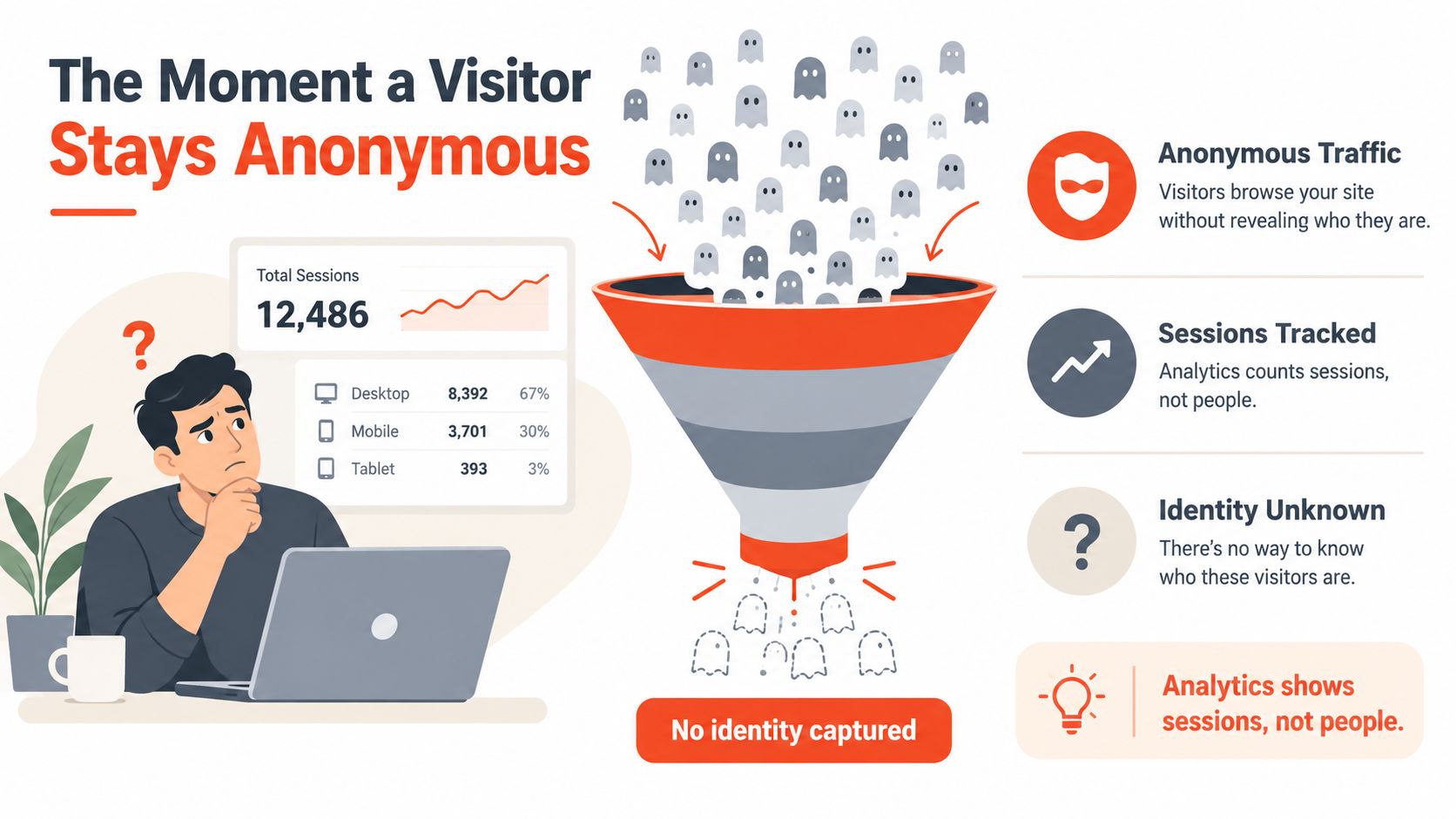
A demo request changes the value of the visit. Contact details can enter the CRM, trigger a relevant email, support retargeting where consent allows, and give sales context about the pages or product areas that influenced the request. Lead capture turns activity into an addressable relationship.
The gap is large. B2B websites typically convert only 1% to 3% of visitors into leads, so 97% to 99% of traffic leaves before any contact is captured, according to 2026 B2B lead generation benchmarks. Intent, audience, offer, and page quality change the result, but the underlying leak remains: value disappears before qualification starts.
Interactive product demos can reduce that leak because they let visitors experience the product before asking for contact details. A form placed after meaningful interaction can feel like the next step, rather than a tollbooth at the entrance. Traditional forms still have a role, but timing and context determine whether they create useful records or drive people away.
Practical rule: Treat anonymous traffic as evidence of interest, not as a sales pipeline.
The capture moment might be an email field after a product tour, a chat exchange, a demo request, or a useful tool that asks for details before showing its result. The goal is a permission-based, actionable record instead of another anonymous session.
What Lead Capture Actually Means
In plain English, lead capture means collecting identifying information from an interested visitor and turning it into a usable prospect record. Common details include a name, email address, phone number, company, job title, or another piece of information that helps a team follow up. The Shopify definition of lead capture also describes the process as collecting contact information from prospective customers who have shown interest but haven't bought.
Three related terms often blur together:
- Lead generation brings potential visitors into the funnel. Search content, paid campaigns, partnerships, and social posts can generate attention. A well-ranked article about onboarding software may attract a founder who has never heard of your product.
- Lead capture identifies the interested visitor. An in-article email exchange, demo request, or product walkthrough can turn that reader into a known contact.
- Lead qualification evaluates the captured contact. A scoring rule might look at company fit, role, stated need, product usage, or buying timing, then route the record to marketing or sales.
Suppose a prospect discovers a SaaS company through a blog post. The article generates the visit. A short form captures the reader's email and perhaps their company. A qualification rule then tags the record according to fit and intent. Each stage has a different job, and confusing them creates poor handoffs.
The record is the unit of value
A page view isn't a lead. A cookie isn't automatically a person. A click may show interest, but it doesn't give a sales or lifecycle team a reliable way to continue the conversation. The captured record is the operational unit because it can be stored, enriched with relevant context, segmented, and assigned.
Lead capture also includes more than contact details. A responsible flow should make consent clear and preserve useful context, such as the page, demo step, campaign, or question that prompted the exchange. Salesforce's small-business guide to capturing leads describes the broader shift toward chat, embedded tools, automated forms, CRM integration, and real-time qualification.
That means a visitor can become captured without completing a conventional form. A chatbot, interactive tool, or demo can collect an email and intent signal through a different interface. The mechanism changes, but the outcome stays the same: an identifiable prospect record that a business can handle appropriately.
How the Capture Step Works in Practice
Consider a visitor on a SaaS pricing page. They click Get a demo, and several systems begin coordinating behind the scenes.
First, the site records the click and associates it with the current anonymous session. If the visitor has interacted with the company before, the platform may recognize an existing browser identifier or previously stored record. A form then appears, sometimes with information already available through permitted first-party context or enrichment.
The visitor submits an email and name. The marketing system sends the details to the CRM, attaches the source and timestamp, and applies a routing rule. A confirmation email can acknowledge the request, while a notification can alert the assigned sales representative. The exact workflow depends on the stack, but the principle is simple: the submission should create one clean record and several coordinated next actions.
Teams building the email side of this workflow can use a practical resource on how to set up email API for reliable application-to-application sending. For product-led teams, an interactive software sales demo can collect intent during the experience rather than asking for a long request form before the visitor understands the product.
Three paths, one operational result
A chat flow feels different from a form. The bot might ask for a work email after learning what the visitor is trying to accomplish, then send the answers to the CRM through an API. An interactive demo might request an email at a chosen step to reveal the next part of the walkthrough. The visitor experiences a conversation or product exploration, not a static questionnaire.
| Capture Method | Trigger | Identifying Action | Resulting Record |
|---|---|---|---|
| Demo request form | Visitor clicks a booking or demo button | Submits contact fields | Contact with source, timestamp, and request details |
| Chat capture | Visitor answers a qualifying question | Shares details conversationally | Contact with transcript or answers attached |
| Interactive demo | Visitor reaches a gated step | Enters an email or other identifying detail | Contact connected to demo progress and submission context |
All three paths should produce the same basic artifact: a known email, a source, a timestamp, and enough context for a sensible follow-up. If a form creates a duplicate record, loses the campaign source, or sends the lead to an unmonitored inbox, the capture mechanism worked only at the surface level.
Common Methods for Capturing Leads Online
SaaS teams usually combine several capture channels because visitors arrive with different levels of interest. A reader learning about a problem shouldn't face the same request as a buyer comparing products on a pricing page.
A static landing-page form is familiar and easy to measure. It works well when the visitor already understands the offer, such as a request for a consultation or a downloadable resource. The tradeoff is that the form waits for the visitor to decide to engage. A clear landing page with form guide can help teams align the page promise, fields, and follow-up.
Embedded blog forms suit early-stage education. They can offer a newsletter, checklist, or related resource without forcing a reader away from the article. The resulting signal is often warm rather than urgent, so an immediate sales call may be the wrong response.
Live chat creates a two-way exchange. A human can clarify a question, while a chatbot can collect an email after a visitor chooses a relevant path. Branching questions add qualification, but poorly designed bots can feel like a maze and cause the visitor to leave.
Interactive product demos occupy a different position. They let a prospect inspect a workflow, click through a realistic interface, and reveal which steps matter to them. A later email gate can capture someone who has already shown product-specific interest. Rendemo is one example of a platform that publishes interactive product walkthroughs and supports optional lead capture within the experience.
| Method | Friction Level | Intent Signal | Best Funnel Stage |
|---|---|---|---|
| Landing-page form | Medium, depending on fields and offer | Warm to hot | Consideration and decision |
| Blog-embedded form | Low to medium | Cold to warm | Awareness |
| Live chat | Low at entry, higher during qualification | Warm | Consideration |
| Branching chatbot | Medium | Warm to hot | Consideration and decision |
| Interactive product demo | Low before exploration, targeted at capture | Warm to hot | Consideration and decision |
Forms remain useful, especially when the visitor has a clear reason to submit. Demos and chat can perform a different job by earning attention first and collecting information during a relevant exchange. A practical stack often uses a blog form for early interest, chat for questions, and an interactive demo or short request form for high-intent visitors.
Why Form Design Quietly Kills Conversions
Many SaaS forms ask for information the team wants before delivering enough value for the visitor to feel comfortable sharing it. Phone number, company size, job title, budget, timeline, and several dropdowns can turn a simple request into an intake interview.
The relationship between field count and completion is measurable. A 2024 HubSpot study cited in search results found that conversion rates drop by an average of 4.1% for each additional form field, while Ruler Analytics data cited in the same discussion places the overall cross-industry average form conversion rate at 1.7%. These figures appear in this lead capture form guide. The direction is more important than treating either benchmark as a promise for every SaaS page: extra effort creates more opportunities for abandonment.
Small design choices often signal how much work the company expects from the visitor:
- Phone number too early: Ask for it only when the conversation requires it.
- Unnecessary dropdowns: Use the simplest input that captures a useful distinction.
- Hidden reassurance: Explain privacy, contact expectations, and the next step near the form.
- Weak button language: “Submit” describes an action, not the value the visitor receives.
- Unclear follow-up: Tell the visitor whether they'll receive a calendar link, an email, or a personal response.
A short form isn't automatically persuasive. The page still needs a clear promise, accurate message match, and a reason to exchange information. But removing fields that nobody uses gives the visitor less to evaluate and less work to complete.
Earning attention before asking for identity
Interactive demos and overlay tours change the sequence. Instead of extracting details at the entrance, they let the visitor experience a workflow first. The capture request then appears at a moment of curiosity, such as reaching a deeper step or saving progress.
That approach doesn't eliminate friction. It moves friction to a more defensible place. A prospect who has just explored a relevant workflow understands why the company is asking for an email, while a prospect confronted with a long form may not yet know whether the product is worth the exchange. Teams reviewing their form architecture can also use these lead generation form best practices to test field purpose, wording, and timing.
Where Lead Capture Sits in the SaaS Funnel
Lead capture usually belongs between awareness and consideration, not at the very bottom of the funnel. A visitor first discovers a problem or product category, then reaches a moment where sharing identity makes sense. Qualification and sales activity follow after that handoff.
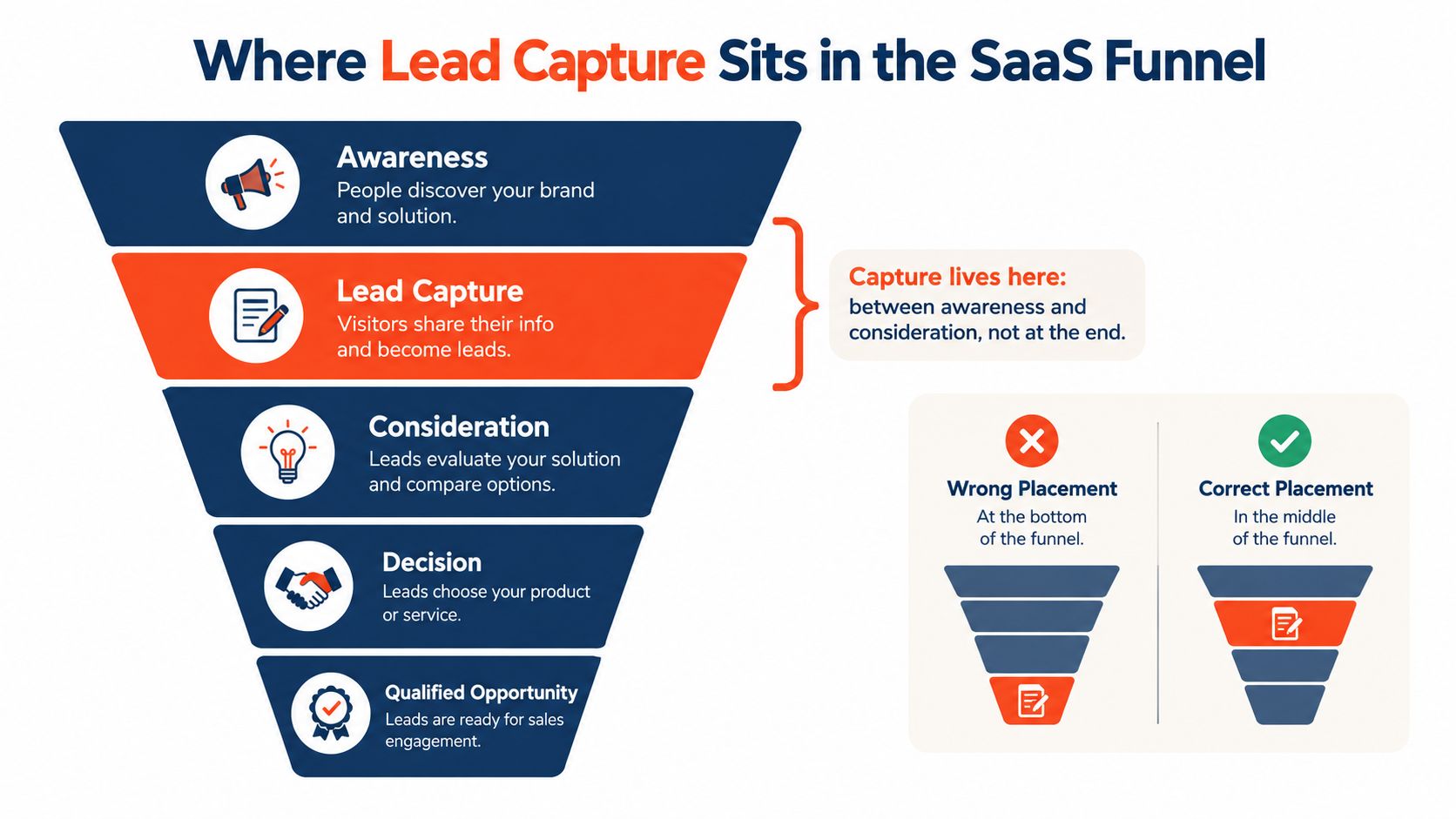
The funnel can be read as a sequence of decisions:
- Awareness: A visitor encounters the company through search, advertising, referral, or another channel.
- Lead capture: The visitor exchanges identifying information through a form, chat, tool, or demo.
- Consideration: The team and the prospect evaluate fit, needs, product capability, and urgency.
- Decision: The prospect reviews commercial details, stakeholders, implementation questions, and risk.
- Qualified opportunity: Sales has enough evidence to treat the conversation as a real opportunity.
The captured record feeds several downstream systems. The CRM stores the contact and activity history. A scoring model prioritizes records based on fit and behavior. A sales or SDR workflow assigns ownership and determines the next human or automated touch.
That makes capture a handoff moment, not a finish line. A record sitting in an unassigned queue has little practical value. A record routed to the wrong territory, stripped of its source, or buried under an automated sequence can lose its context before anyone acts.
A form submission is a starting signal. It isn't proof that the buyer is qualified, ready, or properly followed up.
A digital sales room can help organize the consideration and decision stages by giving buyers a structured place to review product information, evidence, and next steps. The broader role of that environment is covered in this guide to a digital sales room.
The funnel placement also explains why a capture request can work inside a demo. The visitor has moved beyond general awareness and is inspecting the product. Asking for identity at that point can feel connected to the experience rather than detached from it.
The Hidden Problem After the Form Is Submitted
Does a new contact in the CRM mean the funnel worked? It confirms that someone shared information, not that the business can act on it. The record may still wait for routing, ownership, review, and a response that matches the visitor's intent.
A SaaS workflow might assign a contact by territory, company size, or product interest. It could start a nurture sequence before a salesperson reads the visitor's note. If the rule fails, the lead sits in a shared inbox while automated messages continue without human context.
That is why more captured leads don't automatically produce more customers. One 2026 benchmark reported an average lead-to-customer conversion rate of 0.94% across all sources, or roughly one in 106 captured leads becoming closed-won revenue. Capture creates an opportunity. Qualification and follow-up determine whether it remains commercially useful.
Leakage can begin before qualification. The benchmark reported that 85% to 90% of captured leads never become marketing-qualified leads. Separately, this analysis of AI tools for lead capture and follow-up summarizes research reporting that 44% of sales representatives never follow up with a lead at all and 80% of leads never convert. These figures describe the gap between collecting a record and creating a sales conversation.
| First Response Time | Relative Qualification Odds |
|---|---|
| Immediate or clearly assigned response | Stronger opportunity to use fresh context |
| Delayed response | Interest may cool and context may become harder to recover |
| No human or relevant automated response | The record remains captured but commercially inactive |
The exact outcome depends on urgency, category, buyer role, and offer. An interactive demo can reduce one part of this leak by showing product value before the visitor submits details. It also gives the team useful context, such as the feature or step that held attention, instead of handing over an email address with no explanation.
Walk through the journey yourself. Submit the form, inspect the CRM record, follow the routing event, and read the first message. Does the source remain attached? Does one person own the record? Does the response reflect the page or demo step? Can a human act without searching across disconnected systems?
Lead response is part of capture quality. A clean form that sends prospects into silence has only made the leakage easier to count.
A Simple Audit of Your Capture Flow This Week
Run this audit in one afternoon:
- Review the top three forms: Count the fields, remove anything without a clear follow-up purpose, and check that the promise matches the button.
- Trace every submission: Confirm that each form maps to one CRM stage, one owner, and one source field.
- Test mobile rendering: Submit each flow on at least two devices and check typing, validation, consent, and confirmation.
- Measure response time: Compare the actual first-response time with the five-minute benchmark referenced in lead capture form guidance.
- Find one replacement: Identify a high-friction request form where an interactive product demo could let visitors experience value before sharing an email.
Fix the leak you can observe, not the funnel you imagine. A shorter form, cleaner routing rule, or better-timed demo gate can create more useful progress than another campaign sending anonymous traffic to the same page.
Rendemo lets SaaS teams publish real-HTML interactive product walkthroughs, overlay tours, shareable demos, and optional email gates that capture viewer context at a relevant step. Visit Rendemo to create a demo flow that shows the product before asking for the contact.
See it instead of reading about it
Record one workflow from your real product and publish a clickable demo anyone can follow. Real-HTML capture is on the free plan.
Start free